1. Why mini-splits are harder to manage in a rental
A furnace has one thermostat on the wall. A ductless home might have three or four indoor units ("heads"), each with its own handheld remote, and they don't know about each other. In a rental, that causes the same problems over and over:
- Units left running at full heat. Guests check out and leave the bedroom unit at 78°F for the next four empty days.
- Units switched off. In winter, an unheated cabin can drop low enough to freeze pipes before anyone notices.
- Wrong mode. A guest switches to Cool or Dry, and the next guest walks into a cold house on a 30°F night.
- Heads fighting each other. On a multi-zone system, all the heads share one outdoor unit, and it can heat or cool, not both at once. If one guest sets the bedroom to Cool while the living room is on Heat, whichever head asked second just blows air or sits idle. To the guest, the unit "isn't working", and you get a message at night for a unit that's fine.
- Nobody notices. Your cleaner sees it on turnover day, if at all. Between cleanings, nobody is there to check.
You can't fix this with a wall thermostat. Most mini-splits take commands from an infrared remote, so you need a controller that can send those commands for you, or a unit with Wi-Fi built in.
2. What to set them to
Heat pumps are most efficient when they run steadily at low output. Bringing a cold house back up forces them to run at full speed, which is their least efficient. So the right setback depends on how long the property will be empty:
| Situation | Setting |
|---|---|
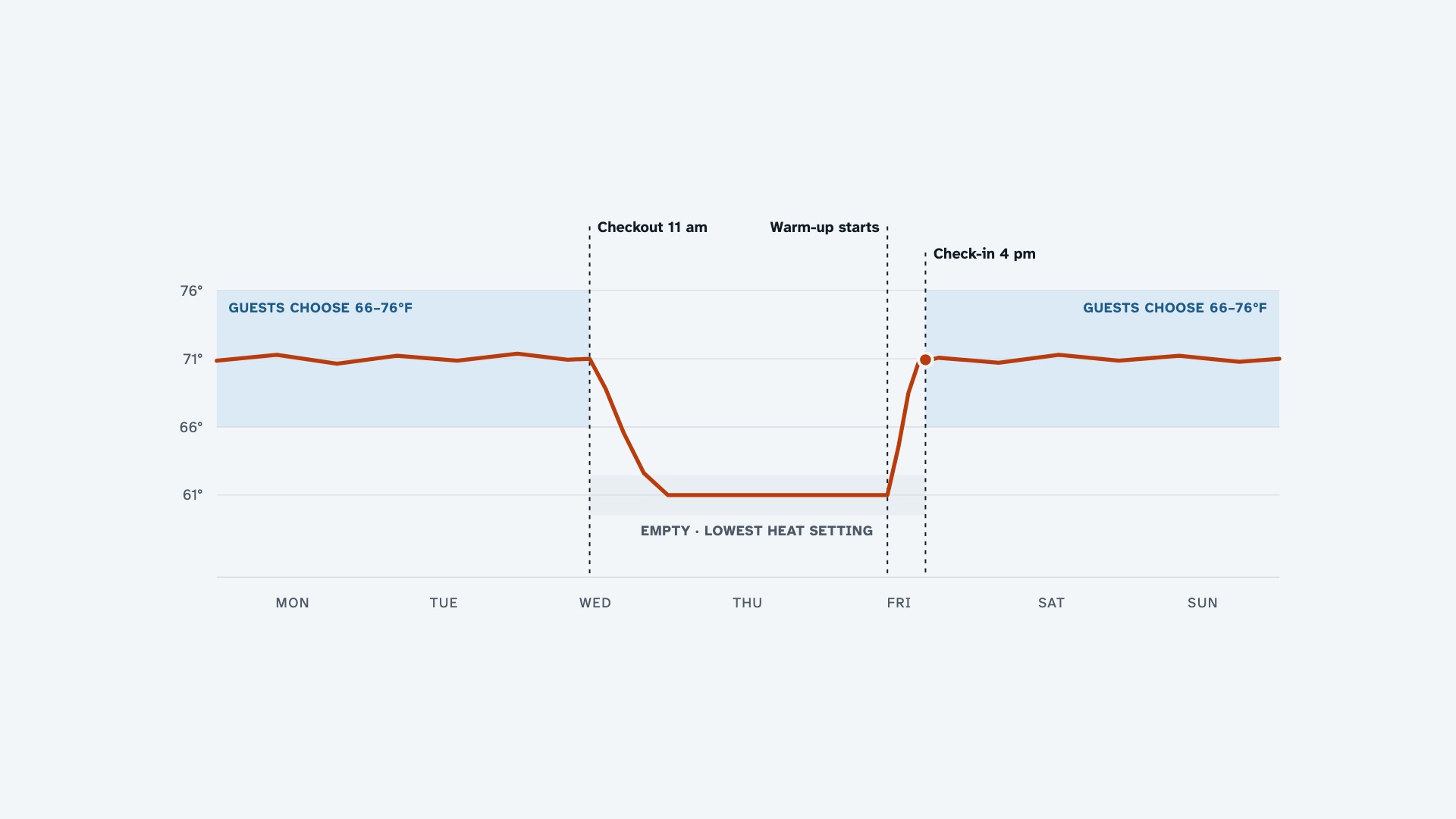
| Guests are staying | Let them choose within a range, about 66–76°F. Reset to 71°F if they go outside it. |
| Same-day turnover | Leave it at about 71°F. Turning it down for a few hours saves little and makes the cleaners cold. |
| Empty overnight or longer | The unit's lowest heat setting, often around 60–61°F. Some units have a 46–50°F freeze-protection mode, which is better for long gaps. |
| A few hours before check-in | Back to about 71°F, so the home is warm when guests walk in. |
| Guest switched a unit off | If it's a spare room, you can leave it off during their stay. They may have turned it off for a reason. Turn it back on to low heat after they check out. |
Two rules matter more than the exact numbers:
- Never switch the heat off in winter. Use a low heat setting instead. A low setting costs little, and a burst pipe is expensive.
- Start warming early. At full output, a mini-split takes hours to bring a cold room up to temperature. Start well before check-in, not when the guest's car pulls in.
3. Option 1: Control them with Cielo
Cielo makes smart controllers (the Breez line) that work with most mini-splits that use an infrared remote. Each controller sits in the room, sends the same commands as the handheld remote, and connects the unit to the free Cielo Home app. Features that help in a rental:
- Temperature Range Lock. Set a minimum and maximum. Guests can adjust inside that range, and only you can change it.
- 7-day schedules. Set different temperatures for different days and times.
- Freeze protection. Turn on low-temperature heating for an empty property, on units that support it.
- Remote control from your phone. Check and change every head from anywhere.
- No subscription. Cielo says schedules, the range lock and usage history are all included at no extra cost.
The limit is that Cielo schedules repeat every week, but your bookings don't. A Friday–Sunday schedule works until a guest books Tuesday to Thursday, extends their stay or cancels. Then you have to update each unit's schedule by hand. Cielo also warns that setting a Temperature Range Lock can turn off existing schedules if the temperatures conflict, so check your schedules after you set a range.
Cielo is a good choice for the hardware. If you only have one property with predictable stays, its schedules may be all you need.
4. Option 2: Let your bookings run them with STR Spark
STR Spark connects to your booking calendar and runs your mini-splits around each reservation, so you don't keep weekly schedules up to date. It works with Cielo controllers and with Cooper & Hunter and Gree+ units that have Wi-Fi built in, all in the same property.
- Reads your bookings from Airbnb, Vrbo and Booking.com calendars, and keeps up with them automatically. Date changes, extensions and cancellations are picked up automatically.
- Warms the home before check-in. Units return to 71°F ahead of arrival, in Auto (heat and cool) by default or Heat only if you choose it for a unit.
- Lets guests stay comfortable. During a stay, guests can set anything from 66°F to 76°F. Outside that range, the unit goes back to 71°F.
- Respects a guest's choice. If a guest switches off a unit, STR Spark leaves it off for the rest of their stay, and switches it back on for the next guest.
- Holds the lowest heat setting when the property is empty, rather than turning the heat off, unless you choose to switch a unit off.
- Emails you if a unit stops responding, for example after a power outage or Wi-Fi drop, so you hear about it before the next guest does.
- Plays it safe. If STR Spark can't read your bookings, it makes no changes.
The same account can also run Mysa baseboard thermostats, Dreo heaters, hot tubs and smart plugs. STR Spark costs $5/month for each listing with at least one device switched on, with 3 months free to start, and you can cancel anytime.
5. A turnover checklist for mini-splits
Whatever you use, have your cleaners check these on every turnover:
- Every head is on the same mode, Heat or Auto, not Cool or Dry. On a multi-zone system, one head left on Cool can stop the others from heating.
- Filters are clean. Dusty filters reduce heat output and cause "the bedroom never gets warm" complaints. Rinse them monthly in winter.
- Remotes are in their place and the batteries work.
- The house manual explains defrost and modes. In freezing weather, the outdoor unit periodically stops heating for a few minutes to melt ice off its coil, and on a multi-zone system every head needs to be on the same mode. Guests often think the unit is broken in both cases, and two sentences in the house manual prevent the 10 p.m. message.
Start with a dry run
Every property in STR Spark starts in a dry run. You can see what it would do with your mini-splits for each upcoming booking before it changes anything. Connect your calendar and try it free →